Phonebook
There are two types of phonebooks, individual and group.
Individual phonebook
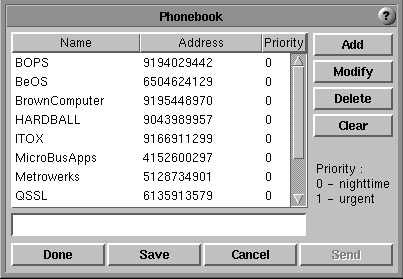
Name, Address, and Priority fields make up a phonebook entry. To make an
entry put a space or spaces between the Name and Address, and the Address and
Priority. You can adjust the size of each field.
Name : like an alias. Don't put a space within this field.
Address : usually a phone number.
Priority : decides when a fax is sent. If it is 1, a fax is sent whenever
the modem device is available. If it is 0, a fax is sent after a certain period
of time that is decided by a cron file. If the
priority is not a number or no priority is specified, softFax applies the current
priority. If the priority is greater than 1, softFax assigns a 1.
- Add : adds the typed entry at the end of the phonebook. softFax does not
check to see if the same item already exists before adding. If an entry has
more than three fields, only the first three fields are accepted and the rest
are ignored.
- Modify : change the selected item to the typed entry.
- Delete : delete the selected item.
- Clear : clear text window.
- Done : write the content of the phonebook on the screen to the
/usr/spool/fax/.phonebook file and end the phonebook dialog.
- Save : write /usr/spool/fax/.phonebook file without ending.
- Cancel : end the phonebook dialog without writing to the file.
- Send : send the current open file to the selected entry.
Group phonebook
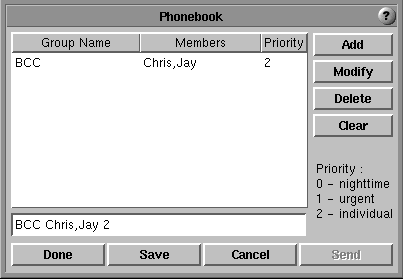
To make an entry put a blank or blanks between the Group Name and Members,
and the Members and Priority and put a comma between members. Group Name : same as Name in the individual phonebook but refers to a group
Members : consists of Names in the individual phonebook
Priority: same as priority in the individual phonebook except for the
priority 2, which means apply the individual priority. If the priority is
greater than 2, softFax assigns 2.
- Add : same as the individual phonebook.
- Modify : same as the individual phonebook.
- Delete : same as the individual phonebook.
- Clear : same as the individual phonebook.
- Done : same as the individual phonebook but use
/usr/spool/fax/.phonebook_gr file.
- Save : same as the individual phoneboot but use
/usr/spool/fax/.phonebook_gr file.
- Cancel : same as the individual phonebook.
- Send : send the current open file to members of the selected group. If the
group priority is 1 or 0, the sending priority is the group priority. If the
group priority is 2, the sending priority is the individual priority.
Click the Name/Group Name or Address/Members buttons for sorting.
![[Previous]](../graphics/prev.gif)
![[Contents]](../graphics/contents.gif)
![[Index]](../graphics/keyword_index.gif)
![[Next]](../graphics/next.gif)